# Swift Package Manager for Firebase
## Introduction
Starting with the 8.0.0 release, Firebase officially supports installation via [Swift
Package Manager](https://swift.org/package-manager/).
Prior to version 8.0.0 (starting with version 6.31.0) support was in Beta.
## Requirements
- Requires Xcode 12.5 or above
- Analytics requires clients to add `-ObjC` linker option.
- See [Package.swift](Package.swift) for supported platform versions.
## Limitations
- Product availability varies by platform. See [the chart on this page](https://firebase.google.com/docs/ios/learn-more#firebase_library_support_by_platform)
for information on product availabilty for each platform.
## Installation
> If you've previously used CocoaPods, remove them from the project with `pod deintegrate`.
### Installing from Xcode
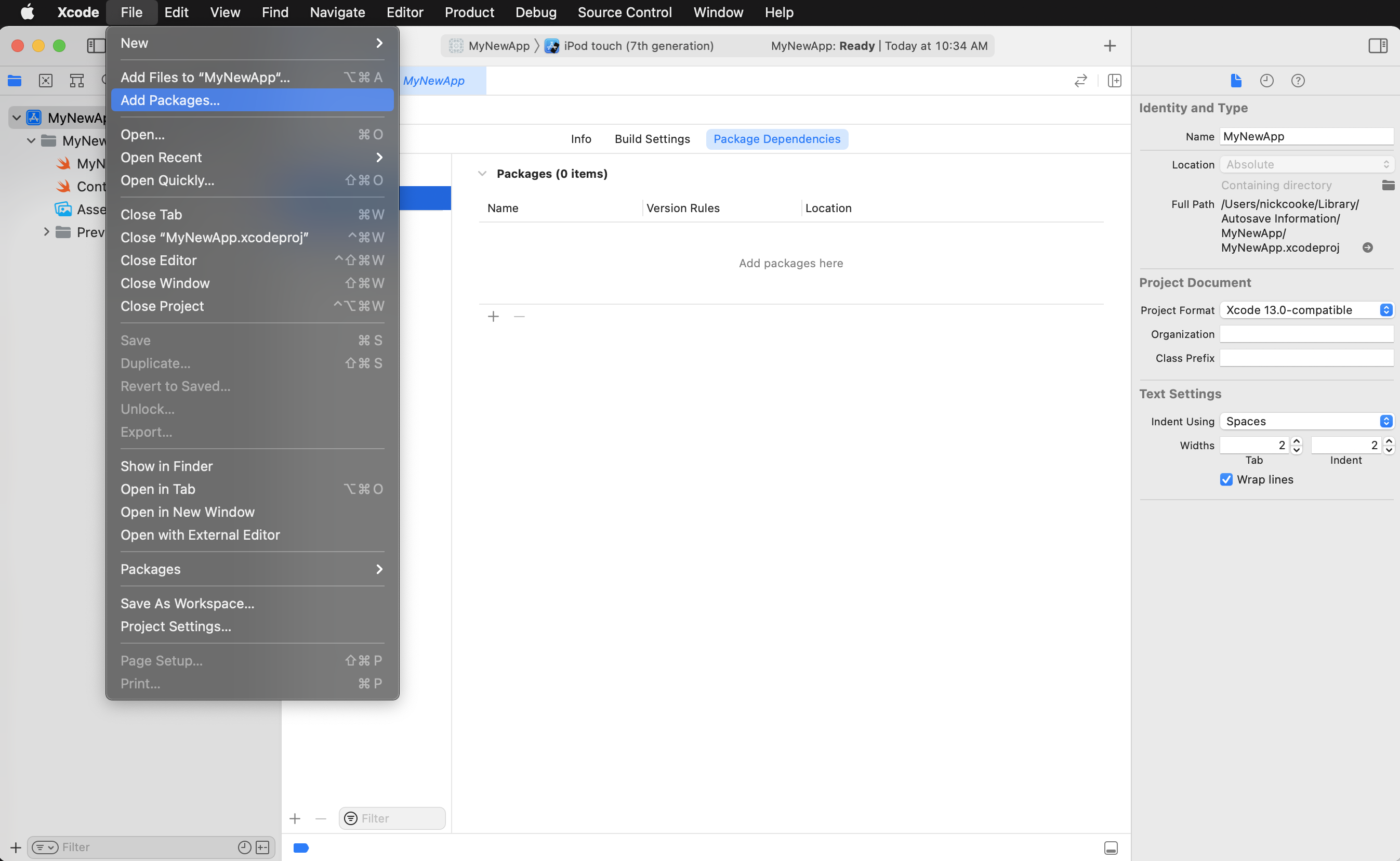
Add a package by selecting `File` → `Add Packages…` in Xcode’s menu bar.
 ---
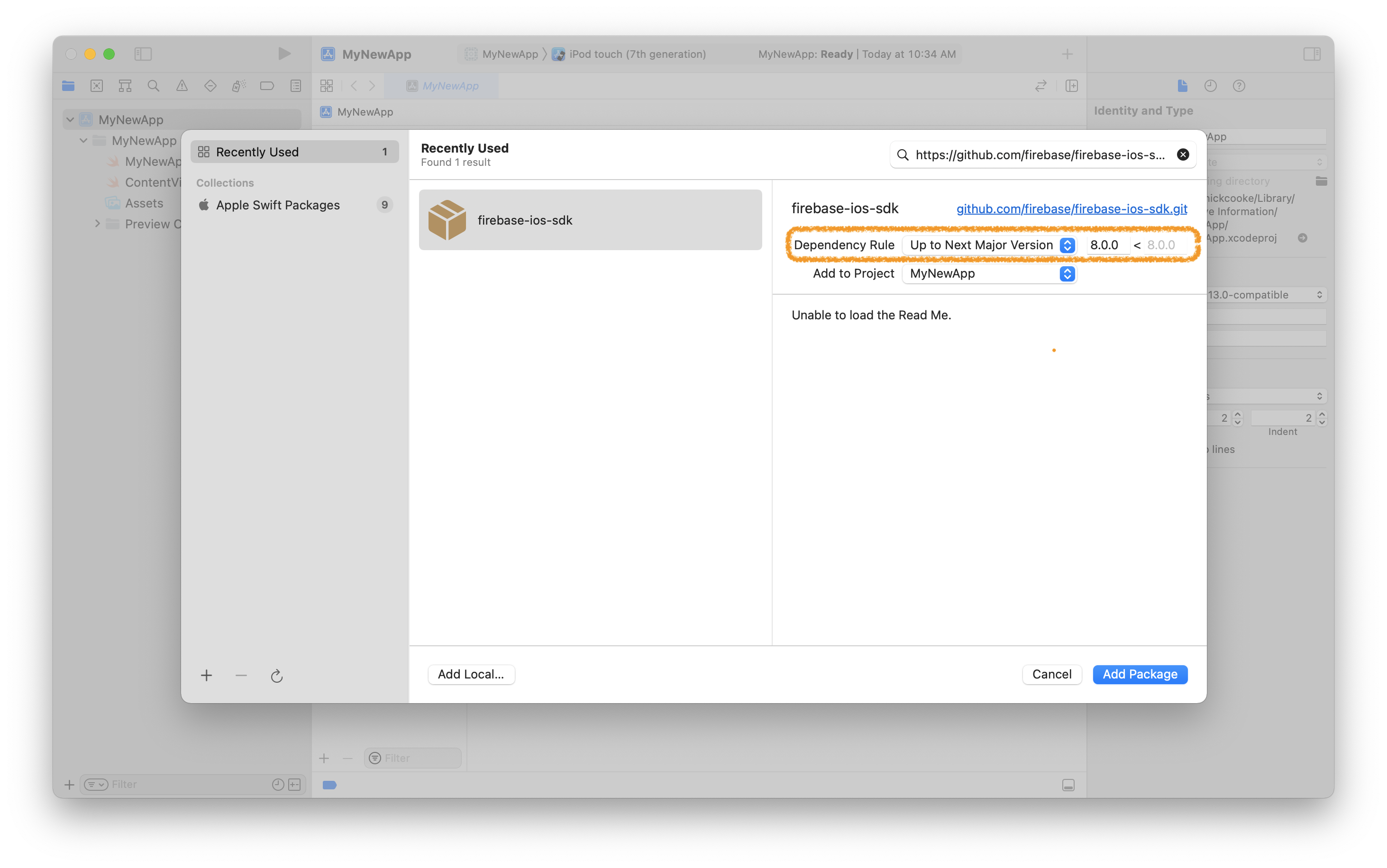
Search for the Firebase Apple SDK using the repo's URL:
```console
https://github.com/firebase/firebase-ios-sdk.git
```
Next, set the **Dependency Rule** to be `Up to Next Major Version` and specify `8.10.0` as the lower bound.
Then, select **Add Package**.
---
Search for the Firebase Apple SDK using the repo's URL:
```console
https://github.com/firebase/firebase-ios-sdk.git
```
Next, set the **Dependency Rule** to be `Up to Next Major Version` and specify `8.10.0` as the lower bound.
Then, select **Add Package**.
 ---
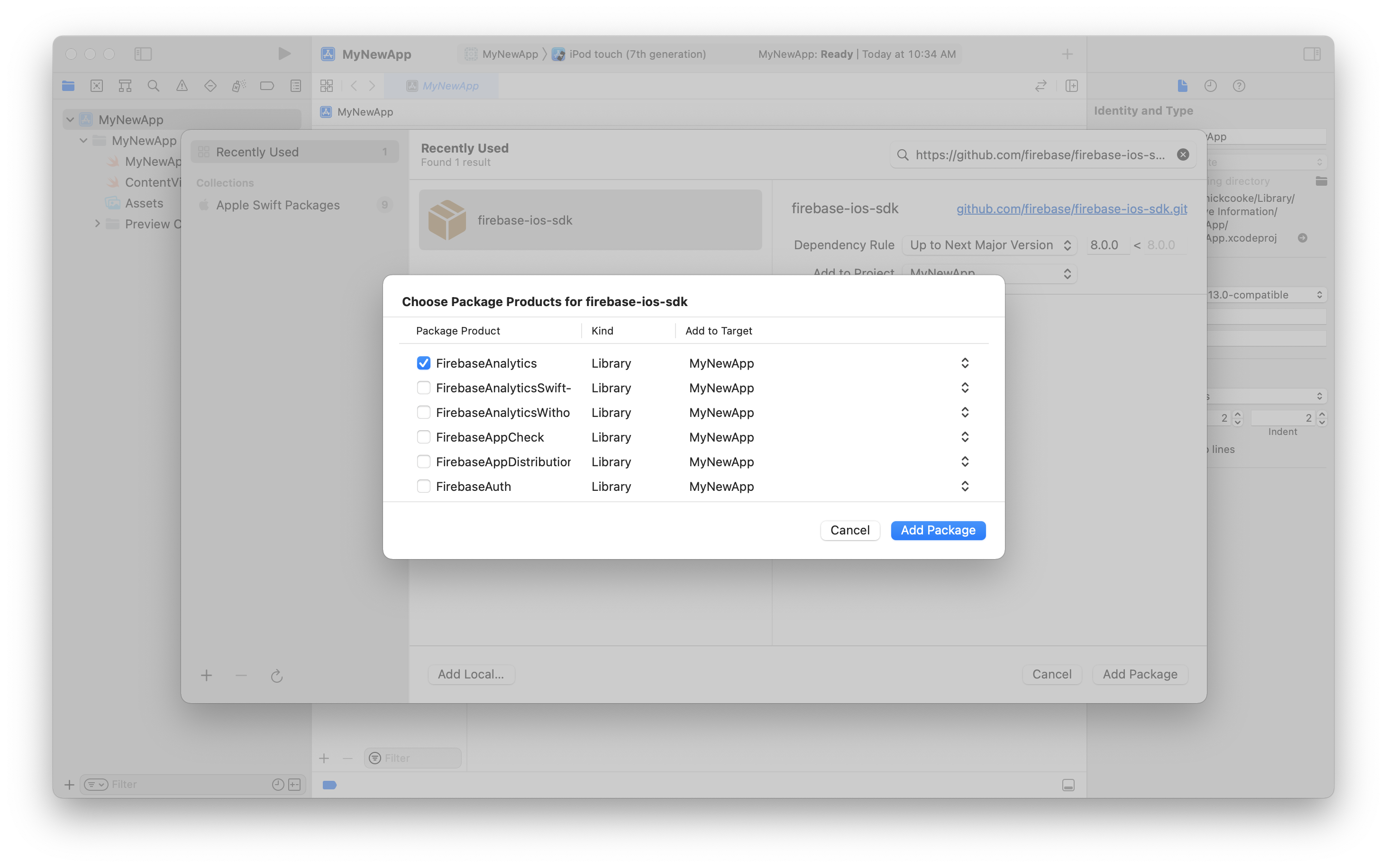
Choose the Firebase products that you want installed in your app.
---
Choose the Firebase products that you want installed in your app.
 ---
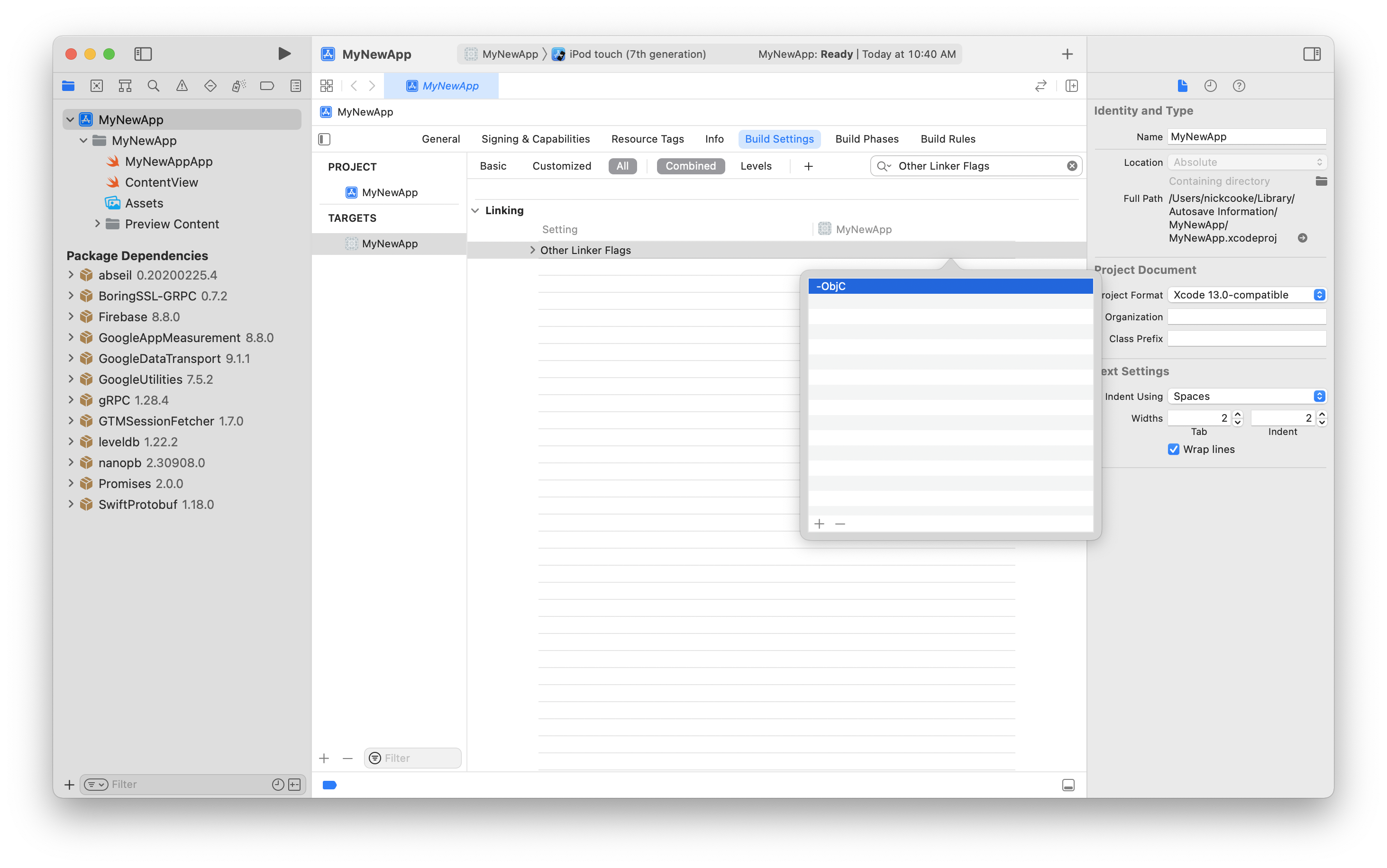
If you've installed **FirebaseAnalytics**, add the `-ObjC` option to `Other Linker Flags`
in the `Build Settings` tab.
---
If you've installed **FirebaseAnalytics**, add the `-ObjC` option to `Other Linker Flags`
in the `Build Settings` tab.
 ---
If you're using FirebaseCrashlytics, you can use
`${BUILD_DIR%/Build/*}/SourcePackages/checkouts/firebase-ios-sdk/Crashlytics/run`
as the run script that allows Xcode to upload your project's dSYM files.
Another option is to use the
[upload-symbols](https://github.com/firebase/firebase-ios-sdk/raw/master/Crashlytics/upload-symbols)
script. Place it in the directory where your `.xcodeproj` file lives,
eg. `scripts/upload-symbols`, and make sure that the file is executable:
`chmod +x scripts/upload-symbols`.
This script can be used to manually upload dSYM files (for usage notes and
additional instructions, run with the `--help` parameter).
---
### Alternatively, add Firebase to a `Package.swift` manifest
To integrate via a `Package.swift` manifest instead of Xcode, you can add
Firebase to the dependencies array of your package:
```swift
dependencies: [
.package(
name: "Firebase",
url: "https://github.com/firebase/firebase-ios-sdk.git",
.upToNextMajor(from: "8.10.0")
),
// Any other dependencies you have...
],
```
Then, in any target that depends on a Firebase product, add it to the `dependencies`
array of that target:
```swift
.target(
name: "MyTargetName",
dependencies: [
// The product(s) you want (e.g. FirebaseAuth).
.product(name: "FirebaseAuth", package: "Firebase"),
]
),
```
## Questions and Issues
Please provide any feedback via a [GitHub
Issue](https://github.com/firebase/firebase-ios-sdk/issues/new?template=bug_report.md).
See current open Swift Package Manager issues
[here](https://github.com/firebase/firebase-ios-sdk/labels/Swift%20Package%20Manager).
---
If you're using FirebaseCrashlytics, you can use
`${BUILD_DIR%/Build/*}/SourcePackages/checkouts/firebase-ios-sdk/Crashlytics/run`
as the run script that allows Xcode to upload your project's dSYM files.
Another option is to use the
[upload-symbols](https://github.com/firebase/firebase-ios-sdk/raw/master/Crashlytics/upload-symbols)
script. Place it in the directory where your `.xcodeproj` file lives,
eg. `scripts/upload-symbols`, and make sure that the file is executable:
`chmod +x scripts/upload-symbols`.
This script can be used to manually upload dSYM files (for usage notes and
additional instructions, run with the `--help` parameter).
---
### Alternatively, add Firebase to a `Package.swift` manifest
To integrate via a `Package.swift` manifest instead of Xcode, you can add
Firebase to the dependencies array of your package:
```swift
dependencies: [
.package(
name: "Firebase",
url: "https://github.com/firebase/firebase-ios-sdk.git",
.upToNextMajor(from: "8.10.0")
),
// Any other dependencies you have...
],
```
Then, in any target that depends on a Firebase product, add it to the `dependencies`
array of that target:
```swift
.target(
name: "MyTargetName",
dependencies: [
// The product(s) you want (e.g. FirebaseAuth).
.product(name: "FirebaseAuth", package: "Firebase"),
]
),
```
## Questions and Issues
Please provide any feedback via a [GitHub
Issue](https://github.com/firebase/firebase-ios-sdk/issues/new?template=bug_report.md).
See current open Swift Package Manager issues
[here](https://github.com/firebase/firebase-ios-sdk/labels/Swift%20Package%20Manager).