# Swift Package Manager for Firebase **Beta**
## Introduction
Starting with the 6.31.0 release, Firebase supports installation via [Swift
Package Manager](https://swift.org/package-manager/) in Beta status.
## Limitations
- Requires Xcode 12.
- Analytics requires clients to add `-ObjC` linker option.
- Analytics is only supported for iOS and cannot be used in apps that support other platforms.
- Performance and Firebase ML are not currently available.
- watchOS support is introduced in 7.0.0 for Auth, Crashlytics, Messaging, and Storage.
## Installation
If you've previously used CocoaPods, remove them from the project with `pod deintegrate`.
### In Xcode
Install Firebase via Swift Package Manager:
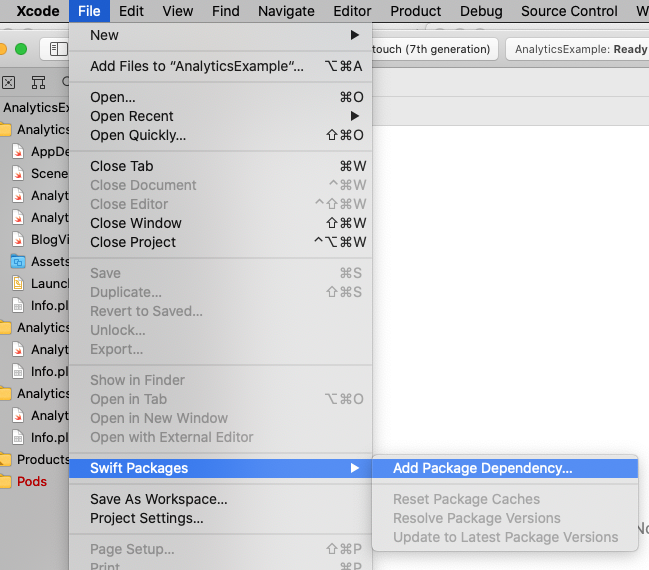 Select the Firebase GitHub repository - `https://github.com/firebase/firebase-ios-sdk.git`:
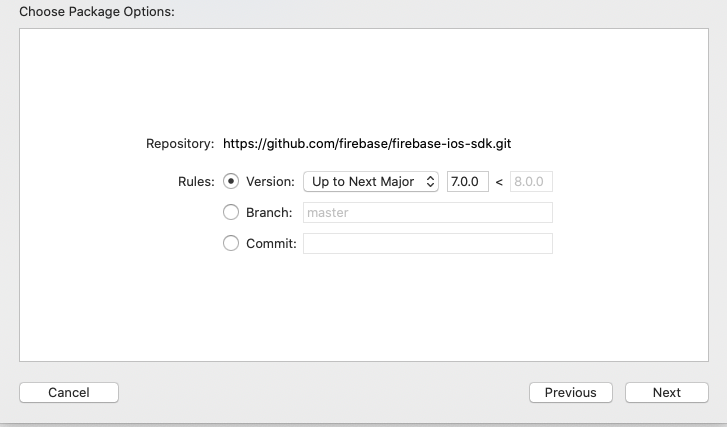
 Select the version.
Note: Prior to the 7.0.0 release, version selection is not available. Instead, the releases
are available in branches with names like 6.34-spm-beta.
Note: The Swift Package Manager distribution continues to be in beta even though it now
supports standard Swift Package Manager versioning.
Select the version.
Note: Prior to the 7.0.0 release, version selection is not available. Instead, the releases
are available in branches with names like 6.34-spm-beta.
Note: The Swift Package Manager distribution continues to be in beta even though it now
supports standard Swift Package Manager versioning.
 Choose the Firebase products that you want installed in your app.
 If you've installed FirebaseAnalytics, Add the `-ObjC` option to `Other Linker Flags`
in the `Build Settings` tab.
If you're using FirebaseAnalytics, Xcode 12.0, and have an issue with
device installation or archive uploading, see the workaround at
https://github.com/firebase/firebase-ios-sdk/issues/6472#issuecomment-694449182.
If you've installed FirebaseAnalytics, Add the `-ObjC` option to `Other Linker Flags`
in the `Build Settings` tab.
If you're using FirebaseAnalytics, Xcode 12.0, and have an issue with
device installation or archive uploading, see the workaround at
https://github.com/firebase/firebase-ios-sdk/issues/6472#issuecomment-694449182.
 If you're using FirebaseCrashlytics, you can use
`${BUILD_DIR%Build/*}/SourcePackages/checkouts/firebase-ios-sdk/Crashlytics/run`
as the run script that allows Xcode to upload your project's dSYM files.
Another option is to use the
[upload-symbols](https://github.com/firebase/firebase-ios-sdk/raw/master/Crashlytics/upload-symbols)
script. Place it in the directory where your `.xcodeproj` file lives,
eg. `scripts/upload-symbols`, and make sure that the file is executable:
`chmod +x scripts/upload-symbols`.
This script can be used to manually upload dSYM files (for usage notes and
additional instructions, run without any parameters).
### Alternatively, add Firebase to a `Package.swift` manifest
To integrate via a `Package.swift` manifest instead of Xcode, you can add
Firebase to your dependencies array of your package with:
```
dependencies: [
// Substitute X.Y with the version of Firebase you want.
.package(name: "Firebase",
url: "https://github.com/firebase/firebase-ios-sdk.git",
.branch("X.Y-spm-beta")),
// Any other dependencies you have...
],
```
Then in any target that depends on a Firebase product, add it to the `dependencies`
array of that target:
```
.target(
name: "MyTargetName",
dependencies: [
// The product name you need. In this example, FirebaseAuth.
.product(name: "FirebaseAuth", package: "Firebase"),
]
),
```
## Questions and Issues
Please provide any feedback via a [GitHub
Issue](https://github.com/firebase/firebase-ios-sdk/issues/new?template=bug_report.md).
See current open Swift Package Manager issues
[here](https://github.com/firebase/firebase-ios-sdk/labels/Swift%20Package%20Manager).
If you're using FirebaseCrashlytics, you can use
`${BUILD_DIR%Build/*}/SourcePackages/checkouts/firebase-ios-sdk/Crashlytics/run`
as the run script that allows Xcode to upload your project's dSYM files.
Another option is to use the
[upload-symbols](https://github.com/firebase/firebase-ios-sdk/raw/master/Crashlytics/upload-symbols)
script. Place it in the directory where your `.xcodeproj` file lives,
eg. `scripts/upload-symbols`, and make sure that the file is executable:
`chmod +x scripts/upload-symbols`.
This script can be used to manually upload dSYM files (for usage notes and
additional instructions, run without any parameters).
### Alternatively, add Firebase to a `Package.swift` manifest
To integrate via a `Package.swift` manifest instead of Xcode, you can add
Firebase to your dependencies array of your package with:
```
dependencies: [
// Substitute X.Y with the version of Firebase you want.
.package(name: "Firebase",
url: "https://github.com/firebase/firebase-ios-sdk.git",
.branch("X.Y-spm-beta")),
// Any other dependencies you have...
],
```
Then in any target that depends on a Firebase product, add it to the `dependencies`
array of that target:
```
.target(
name: "MyTargetName",
dependencies: [
// The product name you need. In this example, FirebaseAuth.
.product(name: "FirebaseAuth", package: "Firebase"),
]
),
```
## Questions and Issues
Please provide any feedback via a [GitHub
Issue](https://github.com/firebase/firebase-ios-sdk/issues/new?template=bug_report.md).
See current open Swift Package Manager issues
[here](https://github.com/firebase/firebase-ios-sdk/labels/Swift%20Package%20Manager).