
 PualGeorge
87b7fd56ff
[Flutter] update to version 3.0.0
PualGeorge
87b7fd56ff
[Flutter] update to version 3.0.0
|
11 months ago | |
|---|---|---|
| .. | ||
| android | 11 months ago | |
| assets | 1 year ago | |
| example | 11 months ago | |
| ios | 1 year ago | |
| lib | 11 months ago | |
| test | 1 year ago | |
| CHANGELOG.md | 11 months ago | |
| LICENSE | 1 year ago | |
| README.md | 1 year ago | |
| README.zh-CN.md | 1 year ago | |
| analysis_options.yaml | 1 year ago | |
| pubspec.yaml | 11 months ago | |
README.md
English | 简体中文
Tencent Cloud UIKit for Video Conference
 TUIRoomKit (tencent_conference_uikit) is Tencent Cloud launched a positioning enterprise meeting, online class, network salon and other scenes of the UI component, through the integration of the component, you only need to write a few lines of code can add similar video conference functions for your App, and support screen sharing, member management, ban the ban painting, chat and other functions. TUIRoomKit supports Windows, Mac, Android, iOS, Flutter, Web, Electron and other development platforms.



Features
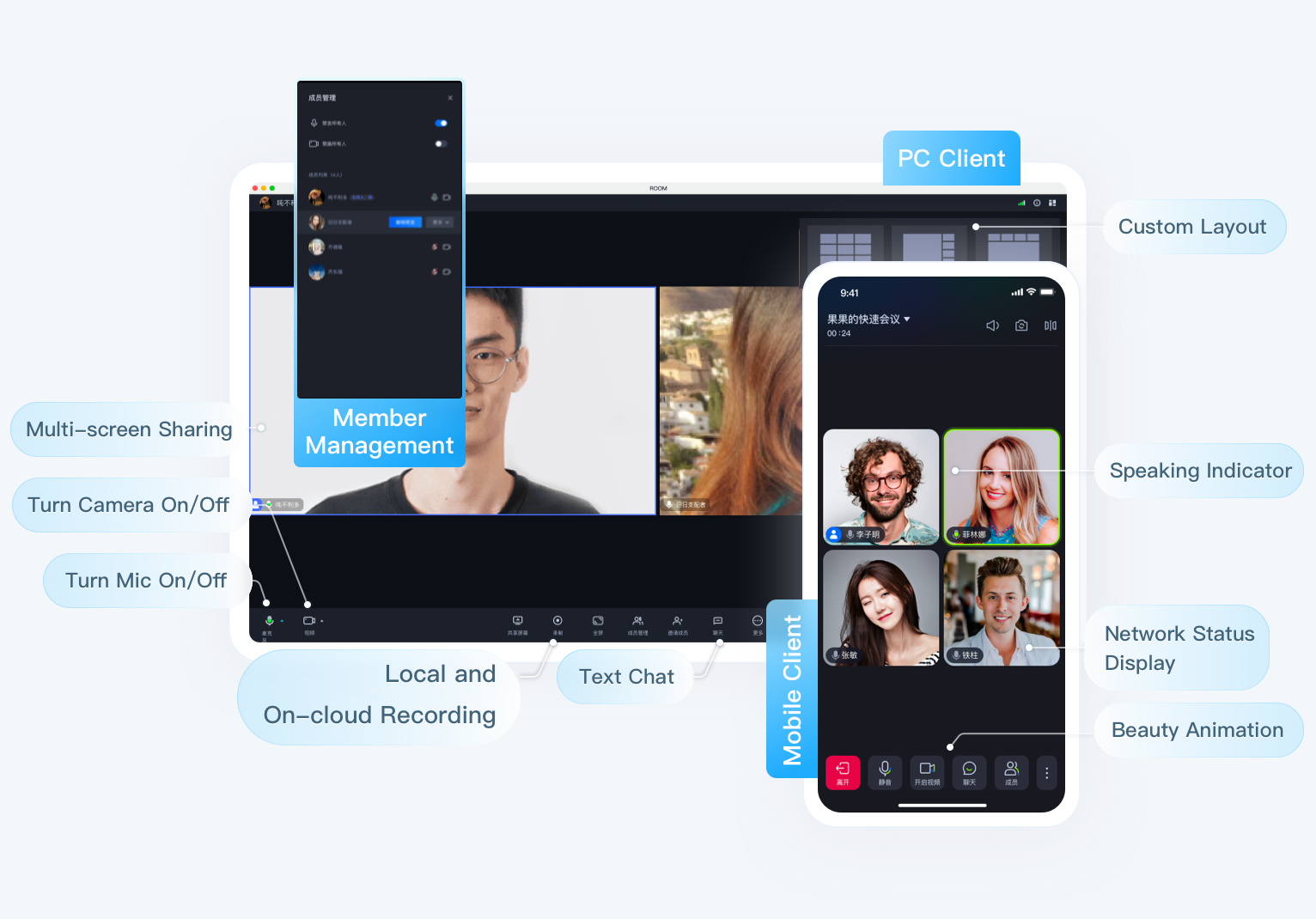
- Easy access: Provide open source components with UI, save 90% development time, fast online video conference function.
- Platform connectivity: TUIRoomKit components of all platforms are interconnected and accessible.
- Screen sharing: Based on the screen acquisition capability of each platform jointly polished by 3000+ market applications, with exclusive AI coding algorithm, lower bit rate and clearer picture.
- Member management: It supports multiple standard room management functions such as all mute, single member gag, drawing, inviting to speak, kicking out of the room, etc.
- Other features: Support room members chat screen, sound Settings and other features, welcome to use.
Make a first video Conference
Environment preparation
| Platform | Version |
| Flutter | 3.7.0 and above versions. |
| Android | - Android 4.1 (SDK API level 16) or later (Android 5.0 (SDK API level 21) or later is recommended). - Android Studio 3.5 or later (Gradle 3.5.4 or later). - Mobile phone on Android 4.1 or later. |
| iOS | iOS 12.0 and higher. |
Active the service
You can follow the steps below to activate the TRTC Conference product service and receive a free 14-day trial version.
Note:
If you wish to purchase the paid version, please refer to TRTC Conference Monthly Packages, follow the Purchasing Guide to complete the purchase.
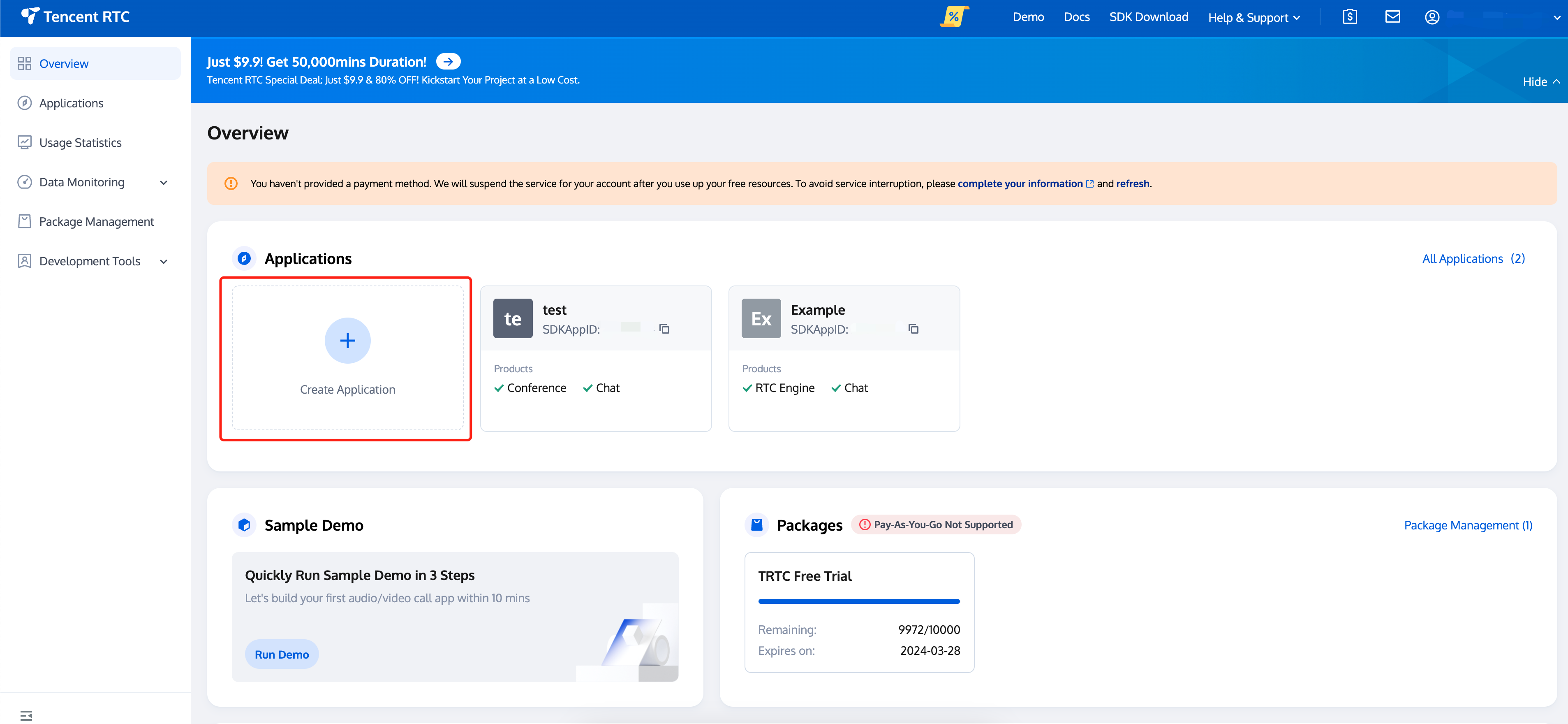
- Visit TRTC Console > Applications, select Create application.
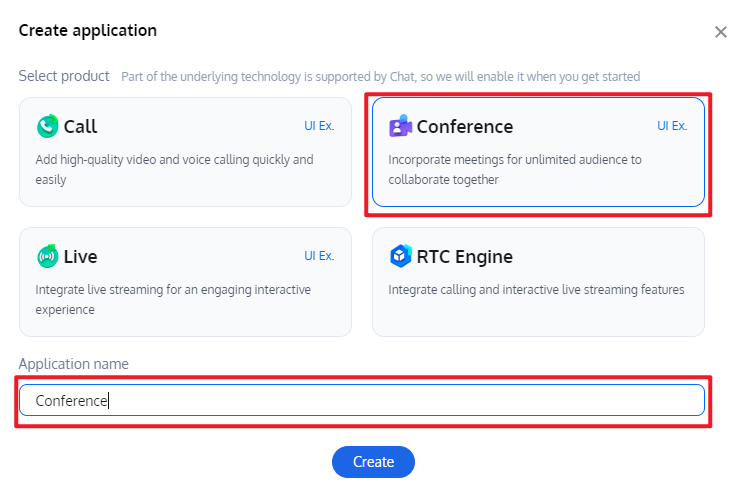
- In the Create application pop-up, select Conference and enter the application name, click Create.
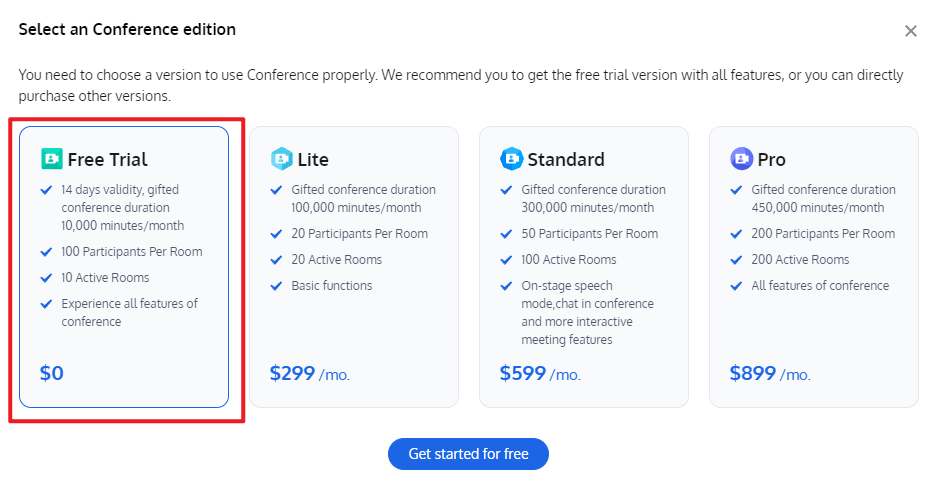
- After completing the application creation, you will default entry to the application details page, select the Free Trail in the floating window, and click to** Get started for free**.
After the activation is completed, you can view the edition information on the current page. The
SDKAppIDandSDKSecretKeyhere will be used in the integration guide.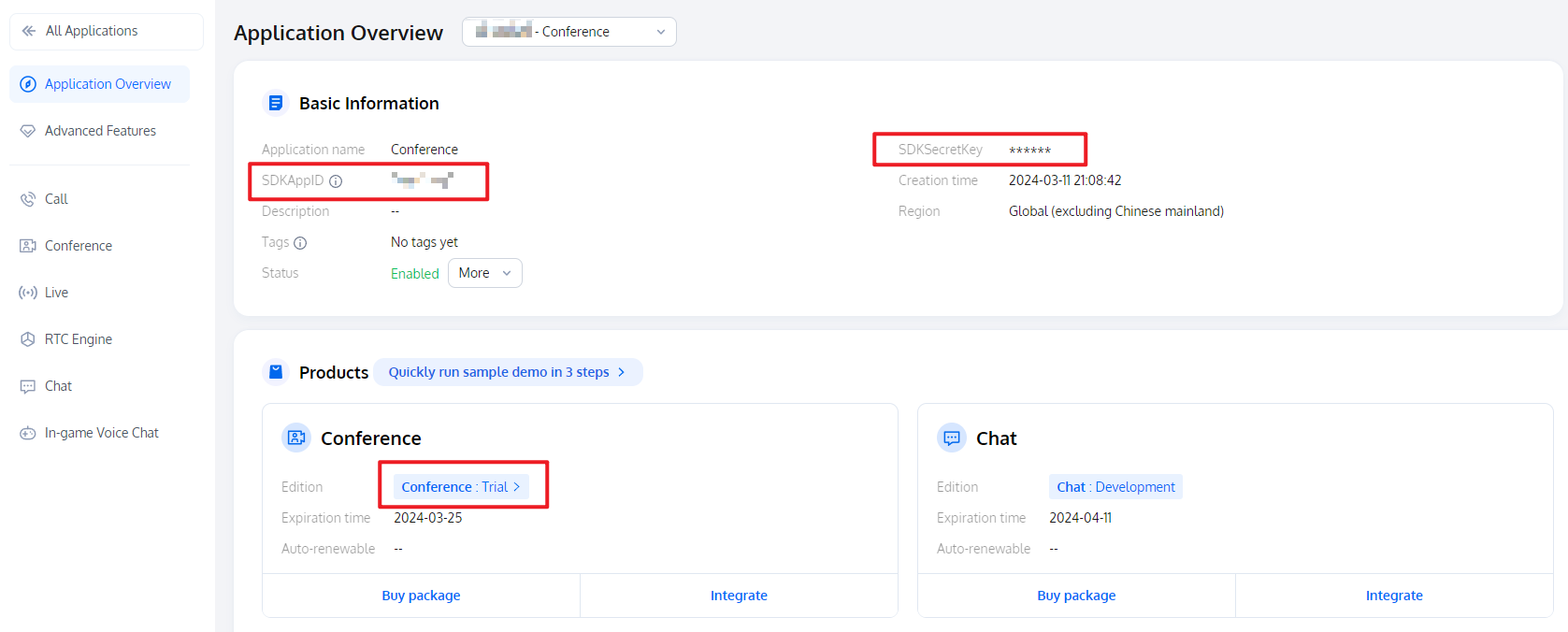
Access and use
- Step 1: Add the dependency
Add the tencent_conference_uikit plugin dependency in pubspec.yaml file in your project.
  dependencies:
   tencent_conference_uikit: latest release version
Execute the following command to install the plugin.
flutter pub get
Step 2: Complete Project Configuration
Since the
tencent_conference_uikithas utilized the relevant features of theGetXstate management library,, you need to useGetMaterialAppinstead ofMaterialAppin your application. Or you can set thenavigatorKeyproperty in yourMaterialApptoGet.keyto achieve the same effect.// This step requires importing the get package before proceeding. // Since the tencent_conference_uikit already has a dependency on get, you don't need to make any additional configurations in your pubspec.yaml. import 'package:get/get.dart'; class MyApp extends StatelessWidget { @override Widget build(BuildContext context) { return GetMaterialApp( // Use GetMaterialApp to replace MaterialApp // Your original MaterialApp content ); } }Use
Xcodeto open your project, select [Project] -> [Building Settings] -> [Deployment], and set the [Strip Style] to Non-Global Symbols to retain all global symbol information.To use the audio and video functions on iOS, you need to authorize the use of the mic and camera (For Android, the relevant permissions have been declared in the SDK, so you do not need to manually configure them).
Add the following two items to the
Info.plistof the App, which correspond to the prompt messages of the mic and camera when the system pops up the authorization dialog box.<key>NSCameraUsageDescription</key> <string>TUIRoom needs access to your Camera permission</string> <key>NSMicrophoneUsageDescription</key> <string>TUIRoom needs access to your Mic permission</string>After completing the above additions, add the following preprocessor definitions in your
ios/Podfileto enable camera and microphone permissions.post_install do |installer| installer.pods_project.targets.each do |target| flutter_additional_ios_build_settings(target) target.build_configurations.each do |config| config.build_settings['GCC_PREPROCESSOR_DEFINITIONS'] ||= [ '$(inherited)', 'PERMISSION_MICROPHONE=1', 'PERMISSION_CAMERA=1', ] end end endStep 3: Login
tencent_conference_uikitplugin
Add the following code to your project, which serves to log in to the component by calling the relevant APIs in TUIRoomKit. This step is extremely critical, as only after logging in can you use the various functions of TUIRoomKit, so please be patient and check if the relevant parameters are configured correctly:
  import 'package:rtc_room_engine/rtc_room_engine.dart';

  var result = await TUIRoomEngine.login(
  SDKAPPID, // Please replace with your SDKAPPID
  'userId', // Please replace with your user ID
  'userSig',// Please replace with your userSig
  );

  if (result.code == TUIError.success) {
    // login success
  } else {
    // login error
  }
Parameter Description
Here is a detailed introduction to the key parameters used in the login function:
SDKAppID:Obtained it in Active the service.
UserID:The ID of the current user, which is a string that can only contain English letters (a-z and A-Z), numbers (0-9), hyphens (-), and underscores (_).
UserSig:The authentication credential used by Tencent Cloud to verify whether the current user is allowed to use the TRTC service. You can get it by using the SDKSecretKey to encrypt information such as SDKAppID and UserID. You can generate a temporary UserSig on the UserSig Tools page in the TRTC console.
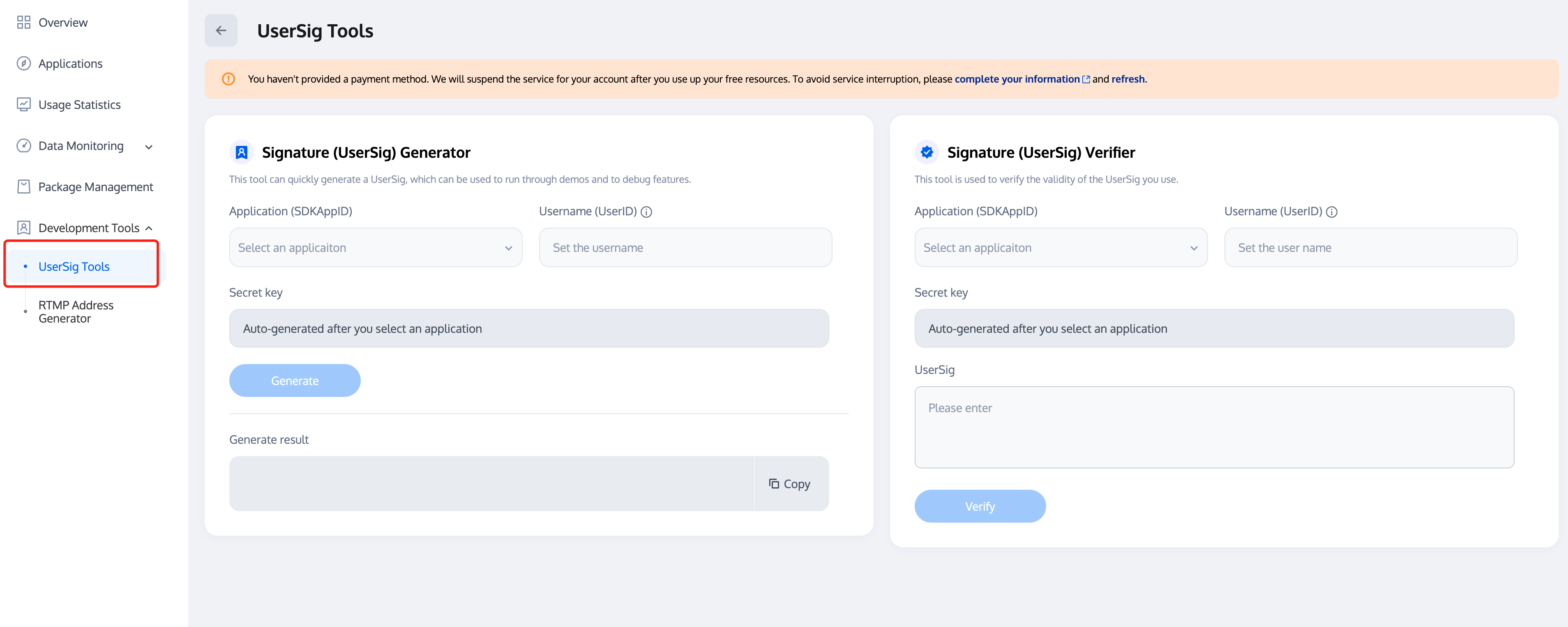
For more information, please refer to the UserSig.
Note:
- Many developers have contacted us with questions regarding this step. Below are some of the frequently encountered problems:
- The
SDKAppIDis set incorrectly.UserSigis set to the value ofSDKSecretKeymistakenly. TheUserSigis generated by using theSDKSecretKeyfor the purpose of encrypting information such asSDKAppID,UserID, and the expiration time. But the value of theUserSigcannot be directly substituted with the value of theSDKSecretKey.- The
UserIDis set to a simple string such as 1, 123, or 111, and your colleague may be using the same UserID while working on a project simultaneously. In this case, login will fail as TUIRoomKit doesn't support login on multiple terminals with the same UserID. Therefore, we recommend you use some distinguishable UserID values during debugging.- The sample code on GitHub uses the
genTestUserSigfunction to calculateUserSiglocally, so as to help you complete the current integration process more quickly. However, this scheme exposes yourSDKSecretKeyin the application code, which makes it difficult for you to upgrade and protect yourSDKSecretKeysubsequently. Therefore, we strongly recommend you run theUserSigcalculation logic on the server and make the application request theUserSigcalculated in real time every time the application uses the TUIRoomKit component from the server.
Log in to Floating Chat (optional)
Flutter **TUIRoomKit** (**tencent_conference_uikit**) introduced the **floating chat feature** starting from version **2.4.1**. If you need to use the floating chat feature, you need to complete the following initialization and login (If you also need to use the [In-Conference Chat](https://trtc.io/document/61632) page, you can Ignore this step and complete the [initialization and login for In-Conference Chat](https://trtc.io/document/61632#3d0fd007-2189-48e0-8391-27d840e075f4)):
``` dart
import 'package:tencent_cloud_chat_sdk/enum/V2TimSDKListener.dart';
import 'package:tencent_cloud_chat_sdk/enum/log_level_enum.dart';
import 'package:tencent_cloud_chat_sdk/models/v2_tim_callback.dart';
import 'package:tencent_cloud_chat_sdk/tencent_im_sdk_plugin.dart';

// Initialize
var initResult = await TencentImSDKPlugin.v2TIMManager.initSDK(
    sdkAppID: SDKAPPID,                     // Replace with your SDKAPPID
    loglevel: LogLevelEnum.V2TIM_LOG_INFO,  // Log registration level
    listener: V2TimSDKListener(),           // Event listener. When using the floating chat, pass an empty object here.
);

if (initResult.code == 0) { // Initialized successfully
    // Login
    V2TimCallback imLoginResult = await TencentImSDKPlugin.v2TIMManager.login(
      userID: 'userId',   // Replace with your userID
      userSig: 'userSig', // Replace with your userSig
    );
}
```

> **Note:**
>
> The floating chat feature is enabled by default in TUIRoomKit. If you do not need the floating chat feature, you do not need to perform the above initialization and login steps. You can disable the floating chat feature through the **Bottom toolbar** -> **Setting** -> **Open Floating Chat** option.
>
Step 4: User
tencent_conference_uikitpluginSet self username and profile photo (optional)
import 'package:rtc_room_engine/rtc_room_engine.dart';

TUIRoomEngine.setSelfInfo(userName, avatarURL);
Start a quick conference
import 'package:tencent_conference_uikit/tencent_conference_uikit.dart';

ConferenceSession.newInstance('your roomId')
..onActionSuccess = _quickStartSuccess
..onActionError = _quickStartError
..quickStart();

void _quickStartSuccess() {
//You can navigate to the conference page on your own in this success callback of starting a quick conference.
Navigator.push(
context,
MaterialPageRoute(
  builder: (context) => ConferenceMainPage(),
),
);
}

void _quickStartError(ConferenceError error, String message) {
debugPrint("code: $error message: $message");
}
Join a conference
import 'package:tencent_conference_uikit/tencent_conference_uikit.dart';

ConferenceSession.newInstance('your roomId')
..onActionSuccess = _joinSuccess
..onActionError = _joinError
..join();

void _joinSuccess() {
//You can navigate to the conference page on your own in this success callback of joining a conference.
Navigator.push(
context,
MaterialPageRoute(
  builder: (context) => ConferenceMainPage(),
),
);
}

void _joinError(ConferenceError error, String message) {
debugPrint("code: $error message: $message");
}
Quick link
- If you encounter difficulties, you can refer to FAQs, here are the most frequently encountered problems of developers, covering various platforms, I hope it can Help you solve problems quickly.
If you would like to see more official examples, you can refer to the example Demo of each platform: Web, Android, iOS, Electron, Qt.
If you would like to see some of our latest product features, you can check the Update Log, here are the latest features of tencent_conference_uikit, as well as the historical version features iterate
For complete API documentation, see API reference: including TUIRoomKit (with UIKit), TUIRoomEngine (without UIKit), and events Callbacks, etc.
If you want to learn more about the projects maintained by Tencent Cloud Media Services Team, you can check our Product Official Website, Github Organizations etc.
Communication and feedback
If you have any suggestions or comments during the use of our product, please feel free to contact us at info_rtc@tencent.com or submit an issue. Your feedback is greatly appreciated.